Zeit, Zeitzone
English
Français
Deutsch
Español
日本語
繁體
简体
Português
Italiano
Русский
World Time , Zeit, Zeitzone , Welt Zeitzone , Uhr
Area
Nordamerika
Anguilla
Antigua und Barbuda
Bahamas
Barbados
Belize
Bermuda
Britische Jungferninseln
Kanada
Kaimaninseln
Costa Rica
Kuba
Curaçao
Dominica
Dominikanische Republik
El Salvador
Grenada
Guadeloupe
Guam
Guatemala
Honduras
Jamaika
Mexiko
Montserrat
Nicaragua
Nördliche Marianen
Panama
Puerto Rico
St. Kitts und Nevis
Heilige Lucia
St. Pierre und Miquelon
Saint Vincent und die Grenadinen
Turks-und Caicosinseln
USA
Amerikanische Jungferninseln
Südamerika
Argentinien
Aruba
Bolivien
Brasilien
Chile
Kolumbien
Ecuador
Falklandinseln
Französisch-Guayana
Guyana
Paraguay
Peru
Uruguay
VenezuPela
Venezuela
Europa
Albanien
Andorra
Armenien
Österreich
Weißrussland
Belgien
Bosnien
Bulgarien
Kroatien
Zypern
Tschechische Republik
Dänemark
Estland
Färöer
Finnland
Frankreich
Deutschland
Gibraltar
Griechenland
Ungarn
Island
Irland
Italien
Kosovo
Lettland
Liechtenstein
Litauen
Luxemburg
Republik Mazedonien
Malta
Moldau
Monaco
Montenegro
Niederlande
Norwegen
Polen
Portugal
Rumänien
Russland
San Marino
Serbien
Slowakei
Slowenien
Spanien
Schweden
Schweiz
Türkei
Großbritannien
Ukraine
Staat Vatikanstadt
Australien-Pazifik
US-Amerikaner Samoa
Australien
Kokosinseln
Cookinseln
Fidschi
Französisch-Polynesien
Kiribati
Marshallinseln
Mikronesien
Nauru
Neuseeland
Niue
Norfolkinsel
Palau
Papua-Neuguinea
Pitcairninseln
Salomonen
Tonga
Tuvalu
Vanuatu
Wallis und Futuna
Asien
Afghanistan
Aserbaidschan
Bahrain
Bangladesch
Bhutan
Brunei
Kambodscha
China
Gazastreifen
Georgien
Hong Kong
Indien
Indonesien
Der Iran
Irak
Israel
Japan
Jordanien
Kasachstan
Kuwait
Kirgisistan
Laos
Libanon
Macao
Malaysia
Mongolei
Myanmar
Nepal
Nordkorea
Oman
Pakistan
Philippinen
Katar
Saudi-Arabien
Singapur
Südkorea
Sri Lanka
Syrien
Taiwan
Tadschikistan
Thailand
Timor
Turkmenistan
Vereinigte Arabische Emirate
Usbekistan
Vietnam
Westjordanland
Jemen
Afrika
Algerien
Angola
Benin
Botsuana
Burkina Faso
Burundi
Kamerun
Kap Verde
Zentralafrikanische Republik
Tschad
Komoren
Kongo
Demokratische Republik Kongo
Cote d'Ivoire Elfenbeinküste
Dschibuti
Ägypten
Äquatorialguinea
Eritrea
Äthiopien
Gabun
Gambia
Ghana
Kenia
Lesotho
Liberia
Libyen
Madagaskar
Malawi
Mali
Mauretanien
Mauritius
Mayotte
Marokko
Mosambik
Namibia
Niger
Nigeria
Reunion Französisch
Ruanda
St. Helena
Sao Tome und Principe
Senegal
Seychellen
Sierra Leone
Somalia
Südafrika
Sudan
Swasiland
Tansania
Togo
Tunesien
Uganda
Westsahara
Sambia
Simbabwe
Kiritimati - Kiritimati World Time , Zeit, Zeitzone , Welt Zeitzone , Uhr
Standard-Zeitzone:
UTC/GMT+14
Sommerzeit:
keine Sommerzeit
aktuelle Zeitzone:
UTC/GMT14
Bringen Sie Freizeit-Werkzeug an!
Drücken Sie Kopie-Taste und fügen Sie in Ihrem Blog oder Ihrer Website.
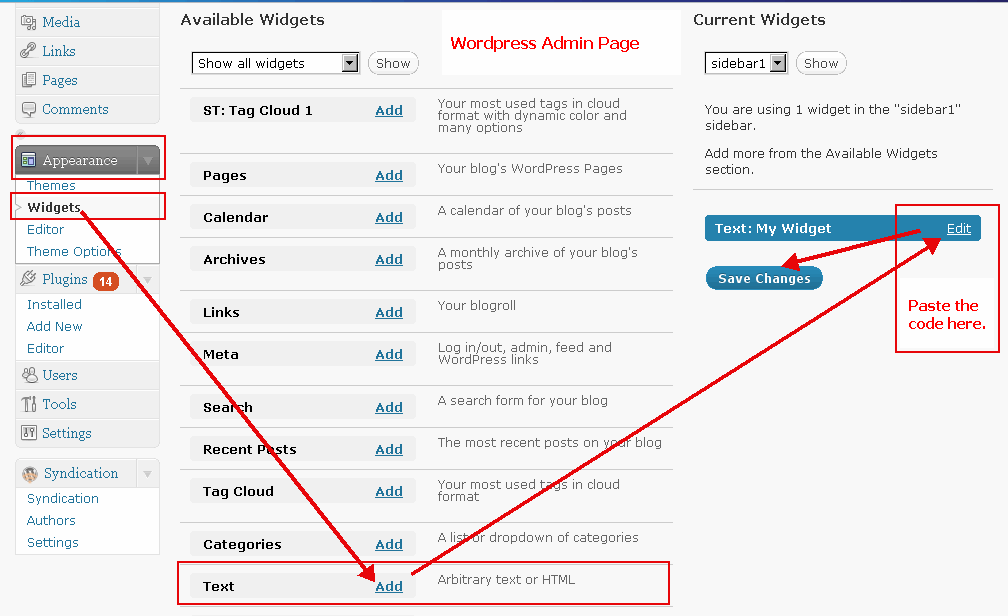
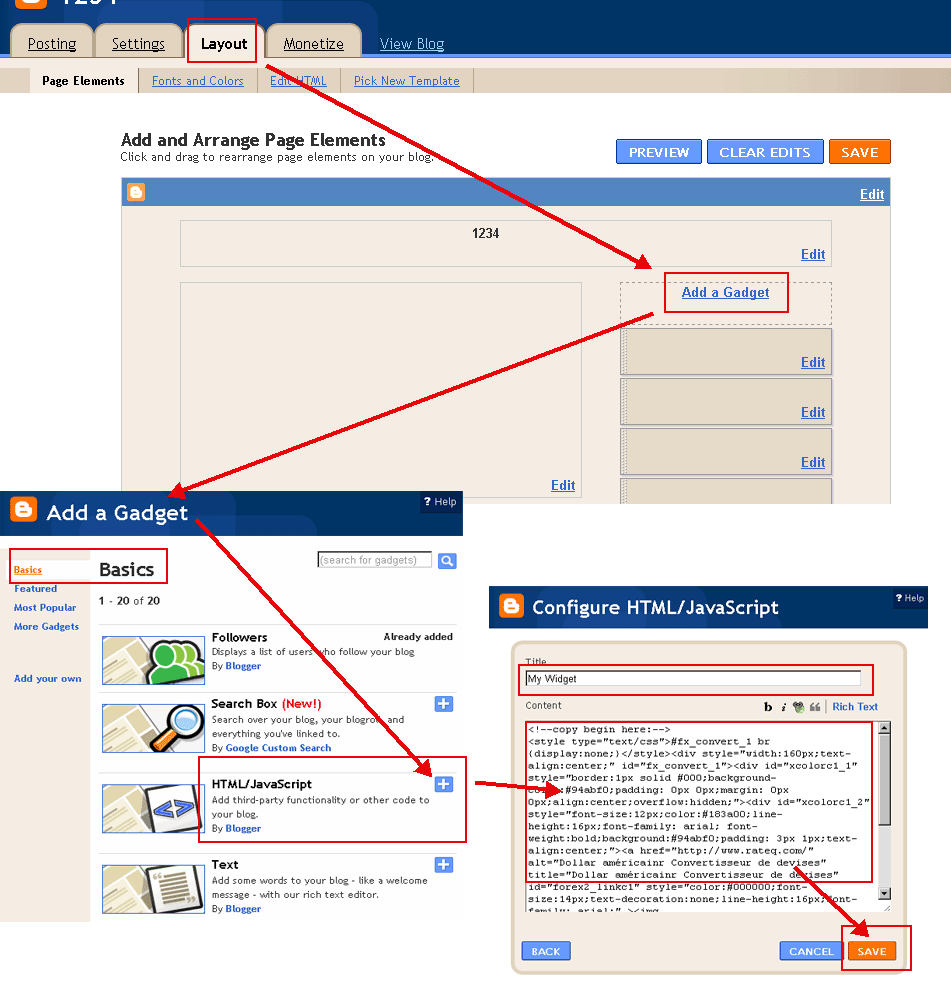
(Wechseln Sie bitte in den 'HTML'-Modus bei der Buchung in Ihrem Blog. Beispiele:
WordPress Beispiel
,
Blogger Beispiel
)
Farbe auswählen(
?
):
Schriftfarbe(
?
):
Datumsformat:
Dür 21 2018 10:23:39 AM
21 Dür 2018 10:23:39 AM
5/21/2018 10:23:39 AM
21/5/2018 10:23:39 AM
2018/5/21 10:23:39 AM
2018-5-21 10:23:39 AM
Dür 21 2018 Montag 10:23:39 AM
21 Dür 2018 Montag 10:23:39 AM
5/21/2018 Montag 10:23:39 AM
21/5/2018 Montag 10:23:39 AM
2018/5/21 Montag 10:23:39 AM
2018-5-21 Montag 10:23:39 AM
2018 5 21 Montag 10:23:39 AM
Montag, Dür 21 2018 10:23:39 AM
Montag, 21 Dür 2018 10:23:39 AM
Montag Dür 21 2018 10:23:39 AM
Montag 21 Dür 2018 10:23:39 AM
Kiritimati Zeit
In Zwischenablage kopieren
<!--copy begin here:--> <style type="text/css">#fx_convert_1 br {display:none;}</style><div style="width:210px;text-align:center;" id="fx_time_1"><div id="xcolorc1_1" style="border:1px solid #000;background-color:#94abf0;padding: 0px 0px;margin: 0px 0px;align:center;overflow:hidden;"><div id="xcolorc1_2" style="font-size:12px;color:#183a00;line-height:16px;font-family: arial; font-weight:bold;background:#94abf0;padding: 3px 1px;text-align:center;"><a href="http://de.timeq.org/Kiritimati" alt="Kiritimati - Kiritimati Zeit" title="Kiritimati - Kiritimati Zeit" id="xtime_link1" style="color:#111111;font-size:14px;text-decoration:none;line-height:16px;font-family: arial;" >Kiritimati Zeit</a></div><div id="clockdeKiritimati1" style="color:#111111;font-size: 1em;font-family: arial; font-weight:bold"></div><script src="http://de.timeq.org/z.php?z=Etc/GMT+14&id=clockdeKiritimati1&t=1"></script></div></div> <!--copy end here:-->
Farbe auswählen(
?
):
Kalender
<<
>>
So
Mo
Di
Mi
Do
Fi
Sa
Kalender|Zeit
In Zwischenablage kopieren
<!--copy begin here:--> <style type="text/css">#mort_cal_1 br {display:none;} #calendar123 td.onToday{color:#ff0000;}</style><div style="width: 160px;text-align:center;"><div style="border:1px solid #000;background-color:#fefefe;color:#333333;padding: 0px 0px;margin: 0px 0px;align:center;text-align:center;overflow:hidden;"><div id="xcolorcs1_1" style="font-size:12px;color:#173a00;line-height:16px;font-family: arial; font-weight:bold;background:#94abf0;padding: 3px 1px;text-align:center;"><a href="http://de.timeq.org/" alt="Kalender|Zeit" title="Kalender|Zeit" id="gooddaycal_link" style="color:#000000;font-size:14px;text-decoration:none;line-height:16px;font-family: arial;" ><img src="http://de.timeq.org/day.gif" border="0" style="margin:0;padding:0;border:0;" />Kalender</a> </div><DIV style="font-size:16px;"><DIV id=calendar123prev style="float:left;cursor:pointer;padding-left:5px;"><<</DIV><DIV id=calendar123next style="float:right;cursor:pointer;padding-right:5px;">>></DIV><SPAN id=calendar123year></SPAN> <SPAN id=calendar123month></SPAN> <TABLE cellSpacing=0 style="padding-left:12px;"><THEAD><TR><TD><font style='color:red;font-size:14px;'>So</font></TD><TD style='font-color:black;font-size:14px;'>Mo</TD><TD style='font-color:black;font-size:14px;'>Di</TD><TD style='font-color:black;font-size:14px;'>Mi</TD style='font-color:black;font-size:14px;'><TD>Do</TD><TD style='font-color:black;font-size:14px;'>Fi</TD><TD><font style='color:red;font-size:14px;'>Sa</font></TD></TR></THEAD><TBODY id=calendar123></TBODY></TABLE><INPUT id=calendar123prevyear type=button value='<<<'><INPUT id=calendar123today type=button value='Heute'><INPUT id=calendar123nextyear type=button value='>>'></DIV><script type="text/javascript" src="http://de.timeq.org/z2.php"></script></div><a href="http://de.timeq.org/" alt="Kalender|Zeit" title="Kalender|Zeit" id="gooddaycal_link2" style="font-size:12px;text-decoration:none;line-height:16px;font-family: arial;align:center;" >Kalender|Zeit</a></div> <!--copy end here:-->
Kiritimati - Kiritimati Informationen & News:
 Kalender